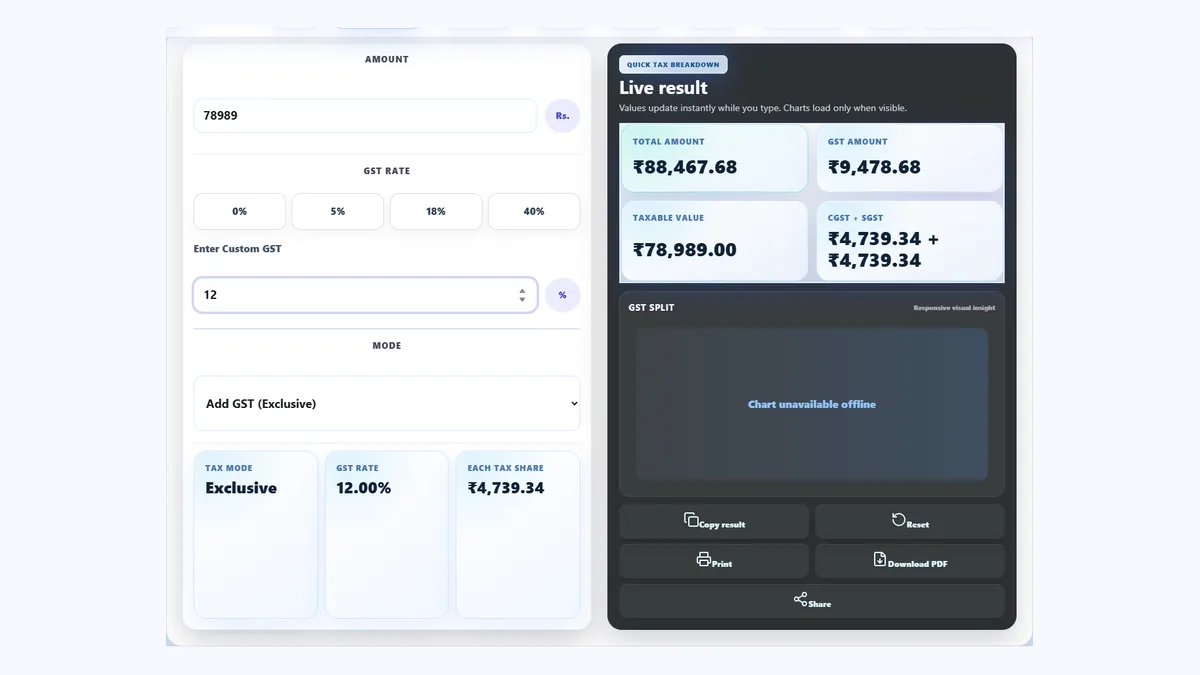
How to Calculate GST Online Using a Free GST Calculator
Learn the difference between GST-inclusive and GST-exclusive prices, use the correct formula, and check common Indian GST rates with practical examples.
FreeGST tool4 ratesWorked examplesMobileFriendly
Updated 2026-06-22
Use a free GST calculator online to add or remove GST instantly.
GST appears on everyday bills, business invoices, service charges and online purchases. The arithmetic is simple once the rate and price type are clear, but mistakes happen when people add tax to a total that already includes it or use the wrong rate.
That is why businesses, freelancers, shop owners, accountants and students often search for a gst calculator online. A quick calculation helps with quotations, invoice reviews, product pricing and classroom examples. A free gst calculator also saves time when several amounts need to be checked one after another.
This guide explains how to calculate gst, how to add it to a base price, and how to remove it from a tax-inclusive total. The examples use common Indian rates and round numbers so each step is easy to verify.
What Is GST?
GST stands for Goods and Services Tax. It is an indirect tax charged on many goods and services. Instead of using several separate indirect taxes at different stages, GST creates a more consistent tax collection system.
In India, registered businesses collect GST on eligible sales and report it through the applicable tax process. The customer normally sees the taxable value, GST rate, tax amount and final total on an invoice. The correct rate depends on the product or service classification, so the rate should always be confirmed before an official bill is issued.
A calculation tool handles the arithmetic; it does not decide the legal classification. That distinction is important for anyone using a gst calculator india workflow for real business records.
What Is a GST Calculator?
A gst calculator takes an amount and tax rate, then shows the GST amount and final price. It can perform two different jobs. In GST-exclusive mode, it adds tax to an original price. In GST-inclusive mode, it separates tax from a total that already contains GST.
This makes an online gst calculator useful for both buyers and sellers. A shop owner can check a selling price, a freelancer can prepare a quote, and an accountant can compare a bill with the expected tax. The ToolsLuv free gst calculator also shows the taxable value and tax split together, which makes the result easier to review.
How to Calculate GST Online
01
Enter the amount
Type the base price or tax-inclusive total you want to check.
02
Choose the GST rate
Select 5%, 12%, 18%, 28%, or enter the rate required for the item.
03
Select the mode
Choose Add GST for an exclusive price or Remove GST for an inclusive total.
04
View the GST amount
Read the calculated tax, taxable value and available CGST/SGST split.
05
Check the final amount
Confirm the total before using it in a quote, invoice or estimate.
For example, enter Rs. 2,000, select 12%, and choose Add GST. The tool shows Rs. 240 as GST and Rs. 2,240 as the final amount. This is the fastest way to calculate gst online when you want a result without writing formulas.
GST Calculation Formula
For a price that does not include tax, use this formula:
GST Amount = Amount x GST Rate / 100
Final Amount = Amount + GST Amount
If the original amount is Rs. 1,000, the result changes with the selected rate:
GST rateOriginal amountGST amountFinal amount
5%Rs. 1,000Rs. 50Rs. 1,050
12%Rs. 1,000Rs. 120Rs. 1,120
18%Rs. 1,000Rs. 180Rs. 1,180
28%Rs. 1,000Rs. 280Rs. 1,280
18 Percent GST Calculation Example
How to Calculate 18% GST
18% is one of the most common GST rates used across many products and services. To calculate 18% GST, multiply the taxable amount by 18 and divide the result by 100.
GST Amount = Amount x 18 / 100
Rs. 10,000 x 18 / 100 = Rs. 1,800. The final amount is Rs. 11,800.
An 18% GST calculator is useful when you need to check several prices or reverse a tax-inclusive total. Enter the amount, select 18%, and choose whether tax should be added or removed. This is quicker than repeating the formula and makes the result easier to verify.
How to Add GST to an Amount
To add GST manually, first find the tax percentage of the original amount. Then add that tax to the base price. Suppose a service costs Rs. 10,000 before tax and the rate is 18%.
GST amount = 10,000 x 18 / 100 = Rs. 1,800.
Final amount = 10,000 + 1,800 = Rs. 11,800.
The same result appears instantly when you enter Rs. 10,000 in the gst tax calculator, choose 18%, and use exclusive mode. The calculator is especially helpful when the amount contains decimals or when several line items use different rates.
How To Add GST To An Amount And How To Remove GST From Total Amount
How to Remove GST From Total Amount
Removing GST is not the same as subtracting the GST percentage from the total. The tax percentage was applied to the original amount, so a reverse formula is needed.
Original Amount = Total Amount x 100 / (100 + GST Rate)
GST Amount = Total Amount - Original Amount
For a total of Rs. 11,800 that includes 18% GST, the original amount is 11,800 x 100 / 118 = Rs. 10,000. The included GST is Rs. 1,800. A reverse gst calculator performs these steps automatically and helps avoid the common mistake of simply deducting 18% from Rs. 11,800.
Use inclusive mode in the gst calculator online when reviewing a retail price, tax-inclusive quote or bill where the final total is already known.
GST Calculator India: CGST, SGST and IGST
Indian GST invoices may show CGST, SGST or IGST depending on the location of the supplier and customer. For an intra-state transaction, the GST amount is generally divided equally between Central GST and State GST. An 18% rate may therefore appear as 9% CGST and 9% SGST.
For an inter-state transaction, IGST generally applies instead of a CGST and SGST split. If the total GST is Rs. 1,800, an intra-state example may show Rs. 900 CGST plus Rs. 900 SGST, while an inter-state example may show Rs. 1,800 IGST.
An online gst calculator can show the numerical split, but the correct treatment depends on place-of-supply rules and the actual transaction. Confirm official requirements when preparing tax documents.
CGST SGST And IGST Explained
Common GST Rates in India
Rates vary by classification and can change. The examples below are broad usage guides, not a substitute for the latest official schedule.
RateGeneral useTax on Rs. 5,000
5%Selected essential goods and lower-rate categoriesRs. 250
12%Selected packaged goods, products and servicesRs. 600
18%Many common services and standard-rate productsRs. 900
28%Selected premium or higher-tax categoriesRs. 1,400
When you calculate gst amount, select the rate listed for the specific product or service rather than choosing a rate from memory.
GST Rates In India
How to Read the GST Calculation Result
A result is easier to trust when every number has a clear meaning. The taxable value is the price before tax. The GST amount is the tax calculated from that value. The final amount is what the customer pays after tax has been added, or the inclusive total that was entered when working backward.
Taxable value
This is the starting price used for the percentage calculation. In exclusive mode, it is normally the amount you enter. In inclusive mode, the tool derives it from the final total. If a bill says Rs. 5,900 including 18% tax, the taxable value is Rs. 5,000 rather than Rs. 5,900.
GST amount
This is the difference between the taxable value and the tax-inclusive total. It may be displayed as one figure or divided into CGST and SGST for an intra-state example. Always check that the split adds back to the total tax amount.
Final amount
This is the payable total after GST. When preparing a quotation, make it clear whether your quoted price is before tax or includes tax. A short note such as “GST extra as applicable” or “price inclusive of GST” prevents confusion between the seller and customer.
Practical GST Examples for Everyday Work
Freelance service invoice
A freelancer charges Rs. 25,000 for an eligible service and applies 18% tax. The tax is Rs. 4,500, so the invoice total becomes Rs. 29,500. If the client and freelancer are in the same state, a simplified split may show Rs. 2,250 as CGST and Rs. 2,250 as SGST.
Retail price that already includes tax
A packaged item is sold for Rs. 2,240 including 12% GST. Divide Rs. 2,240 by 1.12 to recover the original value of Rs. 2,000. The included tax is Rs. 240. This method is useful when only the printed retail total is available.
Product price comparison
Supplier A quotes Rs. 8,000 before 18% tax, while Supplier B quotes Rs. 9,200 including tax. Supplier A reaches Rs. 9,440 after tax. Supplier B has a lower final price, even though its first number appears higher. Comparing both quotations on the same inclusive basis avoids a misleading decision.
Several line items
If an invoice contains products with different rates, calculate each group separately. Do not apply one average percentage to the full invoice unless the accounting treatment specifically allows it. Add the tax amounts from the separate groups at the end, then compare that total with the invoice summary.
These examples show why identifying the price type matters before doing any arithmetic. Once you know whether the figure is before tax or after tax, the correct formula becomes straightforward.
Benefits of Using a Free GST Calculator
Fast calculations
Get taxable value, GST and final total without repeating manual arithmetic.
Accurate results
Consistent formulas reduce typing and percentage mistakes.
Mobile friendly
Check bills and prices from a phone, tablet or desktop browser.
No signup
Use the free gst calculator without creating an account.
The main benefit is clarity. A good gst calculator keeps the original amount, tax amount and final amount visible together, making the result easier to explain and verify.
When Should You Use a GST Calculator?
Use it while creating an invoice, checking a supplier bill, pricing a product, preparing a freelance quote, estimating tax or comparing tax-inclusive offers. Students can also use it to understand percentage calculations with real business examples.
For regular accounting, the calculator is best used as a quick verification tool alongside proper invoicing or bookkeeping software. It helps calculate gst amount, but it does not replace records, return filing or professional advice.
Common GST Calculation Mistakes
Choosing the wrong rate
Confirm the classification instead of assuming every service uses the same rate.
Mixing inclusive and exclusive
Check whether the entered amount already contains GST before selecting the mode.
Using the wrong reverse formula
Do not subtract the GST percentage directly from a tax-inclusive total.
Rounding too early
Keep adequate decimal precision and round the final invoice values consistently.
Most errors disappear when you confirm the rate, identify whether the price is inclusive or exclusive, and compare the result with a reliable gst calculator.
GST Calculator vs Manual GST Calculation
FeatureGST CalculatorManual Calculation
SpeedInstantTakes time
AccuracyReduces mistakesMore chance of error
GST RatesEasy to switch ratesMust calculate manually
Reverse GSTSimpleFormula required
Mobile UseEasyLess convenient
Related Calculator Tools
These existing ToolsLuv calculators can help with pricing, finance and business planning:
A GST calculator finds the tax amount, taxable value and final price from the amount and GST rate you enter. It can handle prices where GST must be added as well as totals where GST is already included.
How do I calculate GST online?
Enter the amount, choose the correct GST rate, select Add GST or Remove GST, and read the GST amount and final value shown by the calculator.
What is a free GST calculator?
A free GST calculator is an online tool that performs GST calculations without a subscription or signup. ToolsLuv runs the calculation instantly in your browser.
How do I add 18% GST?
Multiply the original amount by 18 and divide by 100. Add the result to the original amount. On Rs. 10,000, the GST is Rs. 1,800 and the final amount is Rs. 11,800.
How do I remove GST from total amount?
Multiply the GST-inclusive total by 100 and divide by 100 plus the GST rate. Subtract that original value from the total to find the included GST.
What is reverse GST calculation?
Reverse GST calculation works backward from a tax-inclusive total. It separates the original taxable value and the GST already included in the amount.
Can I calculate GST on mobile?
Yes. The ToolsLuv calculator is mobile friendly and works in a modern phone browser without installing an app.
What is the GST formula?
For an exclusive amount, GST equals amount multiplied by GST rate divided by 100. Final amount equals original amount plus GST.
What is GST Inclusive?
GST inclusive means the displayed total already contains tax. Use Remove GST mode to separate the taxable amount and GST.
What is GST Exclusive?
GST exclusive means the entered amount does not contain tax. Use Add GST mode to calculate the tax and final payable amount.
What is 18% GST on Rs. 1000?
18% GST on Rs. 1000 is Rs. 180, so the final amount becomes Rs. 1180.
How do I calculate GST manually?
Use the formula GST Amount = Amount x GST Rate / 100.
Is this GST Calculator accurate?
Yes, it uses standard GST formulas. Always verify official tax details for legal or accounting work.
Can I remove GST from invoice amount?
Yes, use reverse GST calculation to find the original amount before GST.
What is 5% GST on Rs. 1000?
5% GST on Rs. 1000 is Rs. 50, so the final amount becomes Rs. 1050.
What is 12% GST on Rs. 1000?
12% GST on Rs. 1000 is Rs. 120, so the final amount becomes Rs. 1120.
What is 28% GST on Rs. 1000?
28% GST on Rs. 1000 is Rs. 280, so the final amount becomes Rs. 1280.
Can I use GST Calculator for invoices?
Yes, you can use it for quick invoice estimates, but final tax invoices should be checked according to applicable rules.
Use the Free GST Calculator Now
Calculate GST online instantly
Use the free GST Calculator from ToolsLuv to add tax, remove tax and check the final amount.