Learn how robots.txt and XML sitemaps work together to guide crawlers, improve URL discovery, and support technical SEO without mixing up crawl control and indexing goals.
9 minRead timeComparison guideCrawling vs discoverySEO clarityUse both correctly
Updated June 2026
Quick answer
Robots.txt vs sitemap in one clear explanation
Quick Answer
A robots.txt file helps you control crawler access, while an XML sitemap helps search engines discover important URLs. Robots.txt manages where bots may crawl. A sitemap highlights what they should review. Most websites should use both because crawl control and URL discovery are different technical SEO jobs.
A better way to think about robots.txt vs sitemap is this: robots.txt manages crawler access, while a sitemap supports URL discovery. One file says where bots should be careful. The other file says which URLs are worth checking. If you want a clean technical SEO setup, the choice is rarely robots.txt or sitemap. Most websites benefit from both files working together.
People often search sitemap vs robots.txt when they notice one file in Search Console and are unsure whether the other is still needed. The answer depends on the job. If you need to stop compliant bots from wasting crawl budget on filtered pages, internal search, or duplicate technical folders, robots.txt helps. If you need Google and Bing to discover new categories, article hubs, product pages, or recently updated landing pages, the sitemap matters more. Their purpose overlaps only a little, which is why both files are standard in healthy site architecture.
Important
Robots.txt helps search engines understand where they may crawl. Sitemap helps search engines discover URLs. Neither guarantees indexing.
Robots.txt
What is robots.txt?
A robots.txt file is a plain text file placed at the root of a website, usually at example.com/robots.txt. It gives basic crawl instructions to compliant bots such as Googlebot and Bingbot. The most common directives are User-agent, Allow, and Disallow. These rules tell crawlers whether they should avoid a section, stay out of a search-results folder, or leave crawl access open for important content.
Robots.txt is useful when a site has areas that create crawl noise. That can include faceted filters, tag archives that add little value, parameter combinations, admin areas, thin utility pages, or internal search results. In that sense, robots.txt and sitemap are not competing files. Robots.txt reduces wasted crawler attention, while the sitemap improves the discovery of URLs that deserve it.
What robots.txt does not do is guarantee privacy or permanent removal from search results. If another page links to a blocked URL, search engines may still know that URL exists. That is why robots.txt is best treated as a crawl-management file, not a security layer. If a page must stay private, server-side protection, permissions, or noindex strategies should be reviewed separately.
XML sitemap
What is an XML sitemap?
An XML sitemap is a structured file that lists the URLs you want search engines to discover and revisit. Many sites publish it at /sitemap.xml, though sitemap indexes and segmented sitemaps are also common. A sitemap can include page URLs, last modification dates, and sometimes grouped sections for products, blog posts, images, or international variants.
When people compare robots txt vs xml sitemap, the sitemap side is about discovery, not restriction. Search engines can still find pages without a sitemap through internal linking, navigation, and backlinks, but a sitemap helps surface important URLs faster. That matters most for new sites, large stores, fast-moving blogs, or content collections that are deep in the site structure and do not always receive strong crawl signals immediately.
It is also important to remember that a sitemap is a recommendation, not a guarantee. Listing a URL in a sitemap does not force Google to index it. The page still needs to be crawlable, useful, canonical, and technically sound. A sitemap supports discovery and recrawl timing, but page quality, duplication, and internal linking still influence the final indexing outcome.
Side by side
Robots.txt vs sitemap comparison table
The clearest way to settle xml sitemap vs robots.txt is to compare the exact job of each file. The table below keeps the difference practical so you can decide when a crawl rule is needed and when a discovery file is the right tool.
Robots.txt vs sitemap comparison showing crawl control on one side and URL discovery on the other.
Feature
Robots.txt
XML Sitemap
Purpose
Guide crawler access to folders, paths, and URL patterns.
List URLs you want search engines to discover.
Location
/robots.txt at the domain root.
Often /sitemap.xml or a sitemap index URL.
Crawler Instructions
Yes, through Allow and Disallow rules.
No direct crawl instructions.
URL Discovery
Indirect only when a sitemap URL is referenced.
Yes, discovery is a core purpose.
Indexing Impact
Indirect; manages crawl paths, not guaranteed index status.
Indirect; supports discovery but does not force indexing.
SEO Usage
Reduce crawl waste on low-value technical areas.
Help search engines find and revisit important pages.
File Format
Plain text.
XML.
Required?
Not mandatory, but recommended for most live sites.
Not mandatory, but strongly recommended for discoverability.
Best Practice
Keep rules short, clear, and intentional.
Include only canonical, indexable, useful URLs.
If your site has filtered search URLs, faceted parameters, or admin sections that should stay out of crawl routes, robots.txt is the file you review first. If your site publishes new categories, new articles, service pages, or product collections regularly, the sitemap deserves equal attention. That is why the smartest answer to do I need robots.txt and sitemap is usually yes, because each file solves a different technical problem.
Another way to frame robots.txt and sitemap is operationally. Robots.txt helps you remove friction in the crawl layer. The sitemap helps you surface the pages that deserve attention. Sites that use both intentionally are easier to audit, easier to maintain, and less likely to send mixed signals after content launches or structural changes.
Crawler logic
How robots.txt works
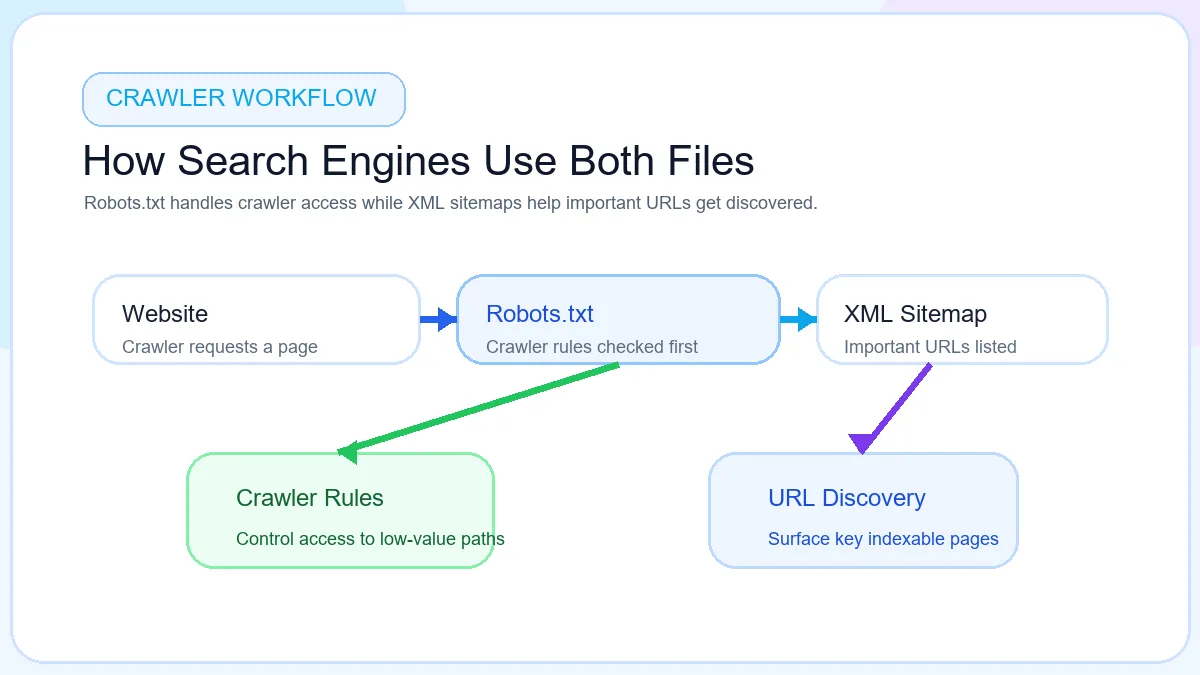
Robots.txt comes into play when a crawler reaches the site and needs to understand its crawl boundaries. A compliant crawler requests the robots.txt file, reads the rules that apply to its user-agent, then decides whether a URL path can be fetched. If a section is disallowed, crawling may stop there. If a path is allowed, the crawler can continue into the site and assess the page normally.
How robots.txt works by checking crawler access before a bot spends time on a URL.
This is especially useful on sites with duplicate navigation paths, filtered catalog URLs, or internal search pages. Instead of letting bots crawl endless combinations that add little SEO value, robots.txt can reduce crawl waste and protect attention for important templates. That does not mean every low-priority page must be blocked, but it does mean crawl control can improve technical discipline when used carefully.
Discovery logic
How sitemap works
An XML sitemap works more like a discovery map than a rules file. The site publishes a structured list of URLs, search engines fetch that file, and the listed pages are added to the pool of URLs worth reviewing. This helps new pages, seasonal landing pages, product groups, and deep content sections get noticed even when internal linking is still catching up.
How sitemap works by sending search engines a clean list of URLs worth reviewing.
A sitemap can also support large sites that use multiple content types. Ecommerce catalogs may need separate sitemaps for products, categories, and images. Publishing teams may prefer separate files for news content, evergreen articles, or international sections. Search engines do not index every listed URL automatically, but a complete, current sitemap gives them a better discovery path than scattered internal links alone.
Together
Do you need both?
In most cases, yes. Websites that publish only a sitemap often miss crawl management opportunities. Websites that publish only robots.txt often miss discovery support. If your site has both important indexable pages and low-value technical sections, using both files gives you a cleaner balance between access control and discoverability.
Think of it this way: robots.txt is about boundaries, while the sitemap is about invitations. A crawler still needs to know where it should not waste time, and it also benefits from a clean list of URLs you want reviewed. This is why robots.txt and sitemap belong in the same technical SEO conversation even though they are not interchangeable.
There are edge cases where one file may matter more than the other. A tiny brochure website with a handful of pages may survive without a detailed robots file, while a large publishing platform might lean heavily on its sitemap strategy. Even then, the combination is still the safer long-term setup because it keeps both access and discovery organized as the site grows.
Robots.txt controls crawling
Use it when duplicate, filtered, or low-value paths create crawl waste that can distract search engines from the pages that matter.
Sitemap improves discovery
Use it when you want faster discovery for important pages, especially on new, large, or frequently updated sites.
Neither guarantees ranking
Content quality, canonical setup, internal linking, and page value still decide whether a discovered page is worth indexing.
Real world example
Three practical site scenarios
Imagine three sites. Website A publishes a sitemap but has no robots.txt rules. Search engines can discover important pages quickly, but bots may still spend time crawling faceted search URLs, staging leftovers, or thin filtered paths. Website B uses robots.txt to block noisy technical folders but does not maintain a sitemap. The crawl layer is cleaner, but new pages may take longer to be found if internal linking is weak. Website C uses both files correctly. It reduces crawl waste while giving search engines a direct list of priority URLs. That combination usually creates the most reliable technical foundation.
This is the core reason comparison queries like robots.txt vs sitemap and do I need robots.txt and sitemap matter. The strongest setups do not choose one file and ignore the other. They let each file handle the job it was designed to do.
For example, an ecommerce store may block internal search and parameter combinations in robots.txt while listing product, category, and help URLs in its sitemap. A content site may leave most crawling open but still rely on the sitemap to surface new articles quickly. A service site with city pages may use a sitemap to keep location landing pages discoverable while robots.txt limits crawl access to low-value lead-form variations.
Use robots.txt when
When to use robots.txt
Robots.txt is most helpful when the site contains paths that create technical clutter. That includes admin areas, internal search pages, faceted filters, duplicate parameter URLs, staging folders, or archives that do not need search visibility. In those situations, robots.txt can stop compliant crawlers from spending time where the SEO payoff is low.
It is also useful after migrations or large site rebuilds when old folders or leftover sections can still attract crawl activity. A short, intentional robots.txt file makes those boundaries obvious. What it should not be used for is hiding pages that are meant to stay private or blocking important content casually. A bad rule can reduce crawl access to assets or pages that still matter to search visibility.
Use robots.txt when the problem is crawler behavior. If the issue is sensitive data, indexing control, or duplicate canonicals, other technical methods may be more appropriate. Robots.txt works best when its role stays narrow and deliberate.
Use XML sitemap when
When to use XML sitemap
An XML sitemap is especially valuable for large websites, new websites, active blogs, and ecommerce stores with many URLs. It helps search engines discover pages that may not yet have strong internal links or external references. It is also useful when pages are added frequently, updated often, or grouped into structured sections that deserve clearer discovery signals.
Blogs benefit because fresh articles can be surfaced sooner. Ecommerce sites benefit because categories, product pages, and seasonal pages often change quickly. Service businesses benefit because landing pages, location pages, and supporting content can all be collected into one clearer discovery framework. If the site grows beyond a simple brochure format, a sitemap usually becomes worth maintaining.
A sitemap is also useful when crawl paths are not obvious from navigation alone. If a page matters for SEO, but it sits deeper in the architecture or depends on pagination or category discovery, the sitemap can help search engines notice it sooner and recrawl it more consistently after updates.
Mistakes
Common mistakes
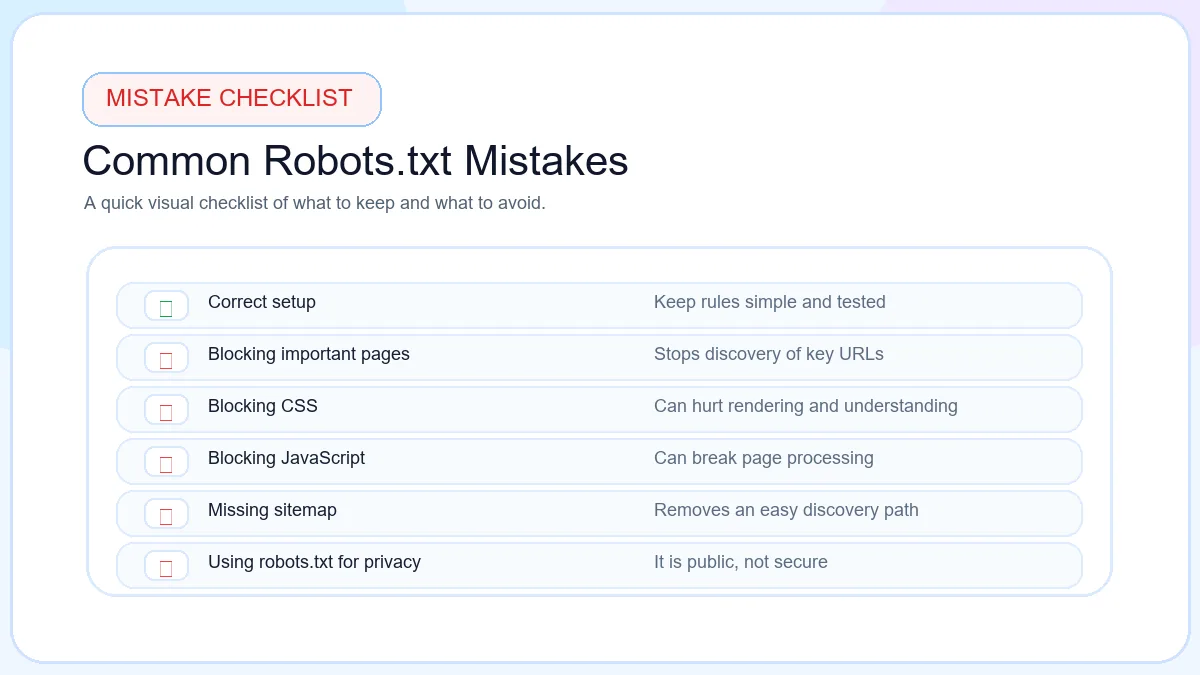
The most common errors happen when site owners expect one file to do the job of the other. Blocking URLs in robots.txt does not make them disappear from search automatically. Publishing a sitemap full of redirected, duplicate, or thin URLs does not improve technical SEO. Good results come from using each file for the right purpose and reviewing both after site changes.
Common robots.txt and sitemap mistakes that reduce crawl quality and discovery clarity.
Blocking URLs in robots.txt
Important categories, templates, or resource folders should never be blocked casually.
Missing sitemap
Large and frequently updated sites lose discovery clarity without a current sitemap.
Wrong sitemap URL
Search Console submissions and robots references should point to the live sitemap location.
Blocking sitemap location
Search engines need access to the sitemap file and the pages listed inside it.
Using robots.txt for privacy
Private content needs authentication or permissions, not a public crawl rule file.
ToolsLuv
Tools to manage technical SEO
If you want to act on this comparison instead of just reading it, keep the toolset simple. Use the Robots.txt Generator when you need clear crawler rules. Use the XML Sitemap Generator when you need a clean sitemap file. Once those are in place, the Meta Tag Generator and Open Graph Generator help improve the pages you actually want discovered and shared properly.
That sequence keeps the work practical. First decide crawl boundaries. Then publish discovery signals. After that, improve the page-level metadata and social preview layers that support click-through and sharing quality. It is a cleaner workflow than trying to solve crawl, discovery, and snippet issues all at once.
FAQ
Frequently Asked Questions
What is robots.txt?
Robots.txt is a root-level text file that gives compliant crawlers instructions about which paths they may crawl and which ones they should avoid.
What is a sitemap?
An XML sitemap is a file that lists important URLs so search engines can discover, revisit, and evaluate them more efficiently.
Do I need both?
In most cases, yes. Robots.txt controls crawler access while the sitemap improves URL discovery.
Can Google find pages without a sitemap?
Yes. Google can discover pages through links, navigation, and external references, but a sitemap usually improves clarity and discovery speed.
Can robots.txt improve SEO?
It can support technical SEO by reducing crawl waste on low-value paths, but it does not act as a ranking signal by itself.
Does robots.txt block indexing?
Not reliably. It blocks crawling, but a URL may still appear in search if it is discovered from other sources.
Where should sitemap.xml be placed?
Many sites place it at /sitemap.xml, though a sitemap index or another crawlable URL can also be valid.
Can I have multiple sitemaps?
Yes. Large sites often split sitemaps by content type or use a sitemap index to organize multiple files.
What happens if robots.txt is missing?
If the file is missing, crawlers usually assume there are no crawl restrictions and continue discovering pages normally.
Should small websites use sitemaps?
Yes. Even small sites benefit from a clean sitemap because it gives search engines a direct list of important URLs.
Free tools
Generate Robots.txt And XML Sitemap
Create crawler rules and sitemap files using free browser-based ToolsLuv SEO tools.